
Keycap Guide
What Are Cherry Profile Keycaps? Decoding the “Gold Standard” for Keyboards
Have you ever invested in an expensive mechanical keyboard, but the typing experience just doesn’t feel right? The problem might not be the switches, but the one thing you touch thousands of times a day: the keycaps. In the diverse world of keycaps, what are Cherry profile keycaps, and why are they hailed as the “gold standard”? This article will be your comprehensive guide to decoding the appeal of the Cherry profile. From comparing it with popular profiles like OEM and SA, to figuring out the perfect choice for your gaming, programming, or typing needs. Let’s dive in!
What Is a Keycap Profile and Why Does It Matter?
Before we delve into Cherry, let’s clarify some fundamental concepts. Understanding this is the first step to mastering your typing experience.
The Concept of Keycap Profile
A keycap profile is the overall shape, height, and curvature of a keycap set. It determines how your fingers “glide” across the keyboard, creating a significant difference in typing feel, sound, and even aesthetics.
How Does Keycap Profile Affect Typing Feel and Sound?
A tall, curved profile like SA will give a feeling of “cupping” the fingers and produce a deep, low-pitched sound (thocky). Conversely, a shorter profile like Cherry or DSA will offer a faster, gliding feel and a sharper, cleaner sound (clacky).
Why Should Gamers and Heavy Typists Care About Profiles?
- For Gamers: A lower profile helps reduce finger travel distance, allowing for faster reflexes in games that demand speed.
- For Heavy Typists (programmers, writers): An ergonomic profile helps reduce wrist and finger fatigue, increasing comfort during long work sessions.
What Are Cherry Profile Keycaps?
Now, let’s get to our main character. The Cherry profile is one of the most popular and beloved keycap profiles in the mechanical keyboard community.
Shape and Structural Characteristics of the Cherry Profile
Cherry profile has a sculpted design, meaning each row of keys has a different height and angle, forming a gentle, concave curve. The keycap surface also has a slight cylindrical scoop to cradle your fingertips. Notably, it is slightly shorter than the OEM profile found on most default mechanical keyboards.
Comparison of Height, Curve, and Angle with Other Profiles
- Height: Shorter than OEM and SA, taller than DSA.
- Curve: Features a distinct ergonomic curve across the rows.
- Angle: The rows are angled thoughtfully to minimize finger movement.
Key Advantages: Comfortable, Easy to Adapt to, Pleasant Sound
- Comfortable Typing Feel: The low, ergonomic design helps reduce hand fatigue.
- Easy to Adapt to: As a popular standard, most users can adapt to it quickly.
- Balanced Sound: It produces a clean typing sound that is not too loud but still satisfying to the ear.
Why Did Cherry Profile Become the “Gold Standard” of Mechanical Keycaps?
The Cherry profile was created by the German company Cherry AG, the famous manufacturer of MX switches. As the “father” of modern mechanical switches, their keycap design naturally became a reference standard. The perfect balance of ergonomics, sound, and aesthetics has helped it win the hearts of millions of users.
Comparing Cherry Profile With Other Popular Profiles
So, how does the Cherry profile stack up against its “rivals”?
Cherry vs. OEM Keycaps – The Difference in Height and Typing Feel
These two are the classic matchup.
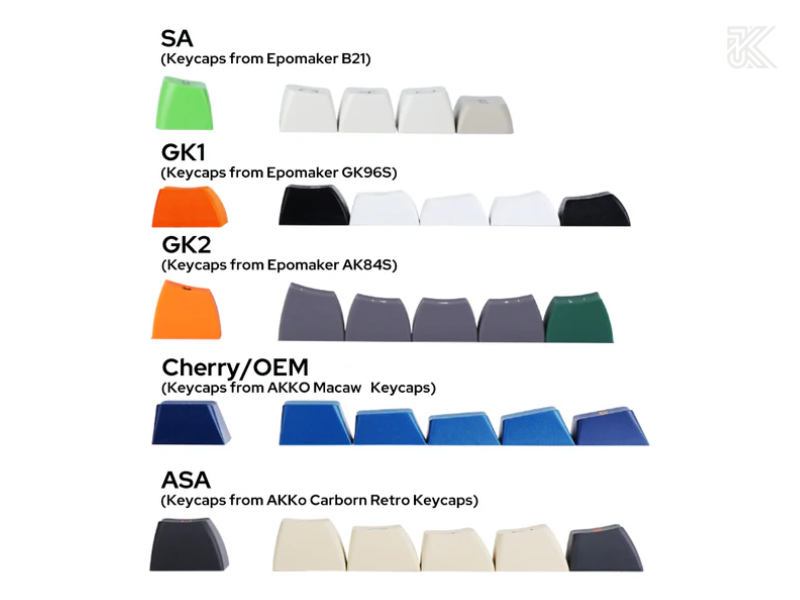
- OEM Profile: The default profile on most pre-built mechanical keyboards. It has a similar shape to Cherry but is slightly taller.
- The Difference: The lower height of the Cherry profile provides a faster and more nimble typing feel, while also producing a somewhat sharper sound. Many argue that Cherry offers a more “premium” typing experience.
Cherry vs. SA vs. DSA Profiles – A Detailed Analysis
This is a battle between different schools of thought:
- SA Profile: Tall, highly sculpted, with a deep spherical scoop on the surface. It offers a retro, vintage look and a distinctive, deep “thocky” sound. However, its significant height can cause fatigue for newcomers.
- DSA Profile: Short, uniform height across all rows, with a spherical scoop. Because all keys are identical, you can easily rearrange the layout (e.g., switching from QWERTY to Dvorak).
Quick Comparison Table of Keycap Profiles
To help you visualize, here is a summary table:
| Attribute | Cherry Profile | OEM Profile | SA Profile | DSA Profile |
|---|---|---|---|---|
| Shape | Sculpted | Sculpted | Sculpted, Spherical | Uniform, Spherical |
| Height | Low-Medium | Medium | Very Tall | Low |
| Typing Feel | Fast, comfortable, ergonomic | Similar to Cherry, but taller | Cups fingers, deep travel | Gliding, flat |
| Sound | Crisp, clean (Clacky) | Similar to Cherry | Deep, low-pitched (Thocky) | Crisp, uniform |
| Best For | Gamers, programmers, heavy typists | Beginners | Retro lovers, sound enthusiasts | Customizers, alt-layout users |
The Typing Feel and Sound of Cherry Profile
So much for theory, but what about the actual experience?
Cherry Profile Sound Test – The Characteristic Sound of Typing
The sound of the Cherry profile is often described as “clacky”—crisp, sharp, and clean. It’s not as deep as SA but not as light as thinner profiles. This is a balanced sound, satisfying enough without being disruptive to others.
Actual Typing Feel: Smooth, Low, Easy to Control
Thanks to its moderate height and ergonomic design, your fingers don’t need to stretch far. This creates a fast, smooth, and easily controllable typing experience, which is especially useful for gaming or high-speed typing.
Feedback from the Gaming and Programming Communities
- Professional gamers often prefer the Cherry profile because it helps them execute in-game actions with precision and speed.
- Programmers and writers appreciate the comfort that the Cherry profile provides, helping them reduce wrist strain after many consecutive hours of work.
Ergonomics and Typing Comfort
This is one of the main reasons the Cherry profile is so beloved.
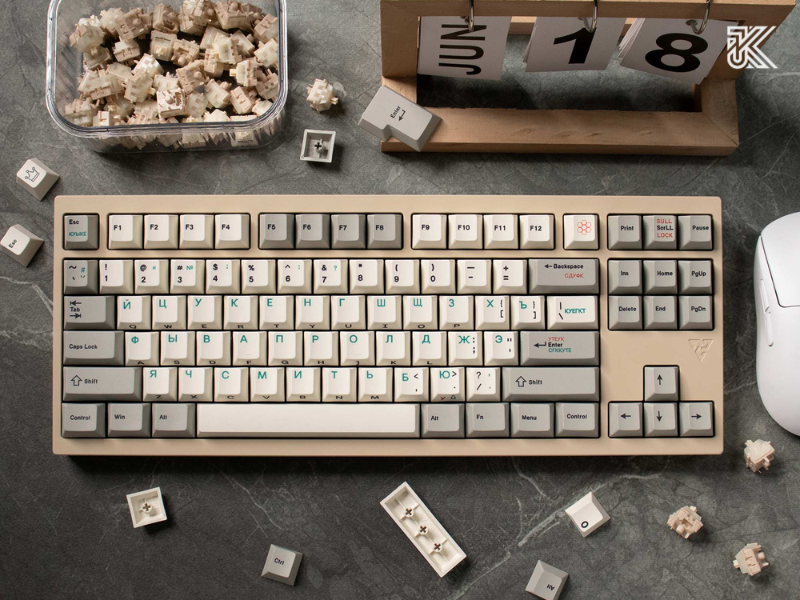
The Ergonomic Design of the Cherry Profile
The curve and angle of each row are calculated to match the natural length of the fingers. The bottom row slopes slightly up, and the top row slopes slightly down, helping to keep your hands in the most natural posture possible.
Is Cherry Profile Suitable for Long Typing Sessions?
Absolutely. Compared to tall profiles like SA or flat profiles like DSA, the ergonomic design of Cherry has proven to be one of the best choices for long-duration typing (best keycap profile for typing).
Ideal Hand Posture to Reduce Wrist Fatigue with Cherry Profile
To maximize comfort, try to keep your wrists straight, not bent up or down. Using a wrist rest of an appropriate height is also a great idea.
Frequently Asked Questions (FAQ)
What is the main difference between Cherry and OEM profiles?
The main difference is height. The OEM profile is slightly taller than the Cherry profile. This makes Cherry feel faster to type on and produce a sharper sound.
Which keycap profile is best for typing and programming?
For most people, the Cherry profile is considered the top choice for long-duration typing and programming due to its excellent ergonomic design, which helps reduce hand fatigue.
Are GMK keycaps Cherry profile?
Yes. GMK is a premium German keycap manufacturer, and they use the original molds from Cherry AG to produce some of the highest quality Cherry profile keycaps in the world.
And so, we’ve come to the end of our journey exploring what Cherry profile keycaps are. From their intelligent ergonomic design to their perfectly balanced typing feel, it’s not hard to see why this is the trusted choice for millions of users. If you’re looking for a worthy upgrade, a solution for tired hands, or simply want to optimize your gaming and work performance, the Cherry profile is an excellent contender.