
Keycap Guide
Keycap Compatibility: Are All Keycaps the Same Size? (Complete Guide)

The mechanical keyboard community in the US (and globally) is constantly growing, and customizing your board with aftermarket keycaps has become an essential trend. Keycaps are not just about aesthetics; they directly affect the typing feel. However, one of the biggest questions for newcomers is: “Are all keycaps the same size?” The answer is no, keycap sizes vary significantly depending on three main factors: keyboard layout, keycap row profile, and stem type you are using. Understanding these differences is key to a successful keycap purchase.
Why Do Keycap Sizes Differ? (Keycap Sizes Explained)
Keycap size isn’t just about length or width. It’s a combination of several technical factors. Here are the three core reasons for keycap size discrepancies.
Differences Due to Keyboard Layout
The layout is the physical arrangement of keys on the keyboard. Layout differences are the most common reason for keycap mismatch, especially for larger modifier keys.
- Most Common: ANSI vs ISO Layout Differences:
- ANSI (American National Standards Institute): The standard prevalent in the US and the default layout for most mechanical keyboards. It features a long rectangular Enter key and a long Left Shift key.
- ISO (International Organization for Standardization): Popular in Europe. It features an inverted “L” or “7”-shaped Enter key and a shorter Left Shift key.
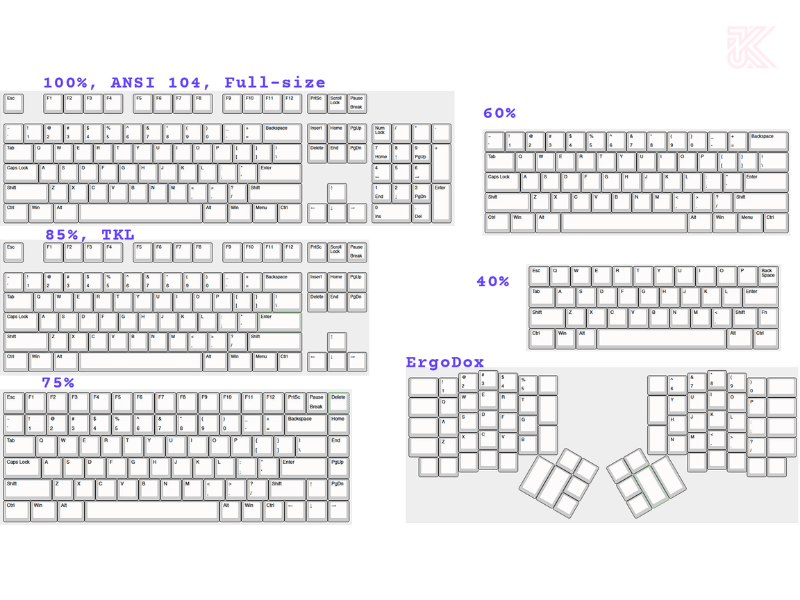
- Size Differences: Keycaps on full-size, tenkeyless (TKL), and 60% keyboards (or 65%, 75%) often have standard sizing for alphabet and number keys (1u – 1 unit). However, keys like Ctrl, Alt, Fn, Shift, Backspace, and especially the Spacebar, have “special” sizes and are easily mismatched if you buy the wrong set.
Keycap Profile Comparison & Row Height
The “Keycap profile” is the overall shape of the keycap, including its height and the slope/curve of its surface. Profile is a major determinant of typing feel and aesthetics.
- Row Height: Some Profiles are designed with varying heights and angles for each row (e.g., Cherry, OEM) to form a natural curve (sculpted). Conversely, some profiles have uniform height across all rows (e.g., DSA, XDA) (uniform).
- Impact on Compatibility: If you buy a Cherry Profile keycap set, you can only replace a Cherry R1 keycap (top row) with another Cherry R1 keycap. Placing an R4 keycap in the R1 position will make the key higher/off-angle.

Keycap Stem Type & Switch Fit
This is a basic technical requirement: The keycap must match the stem of the switch.
- MX-Style Stem: The most common standard today, shaped like a plus sign (+). Nearly 90% of mechanical keyboards on the market, including Cherry, Gateron, Kailh, and Outemu, use this standard. If your keycap has a plus-shaped mount, you are using the MX standard.
- Other Types:
- Topre: Round/oval keycap stem. Not compatible with MX keycaps.
- ALPS: Rectangular keycap stem. Rarer.
- Low-Profile: Keycaps specially designed for shorter switches.

Basic Keycap Size Chart (Keycap Compatibility Chart)
To better understand the keycap set fit guide, you need to grasp the concept of a “unit” (u). The standard size of an alphabet key (A, B, C…) or number key (1, 2, 3…) is called 1u. Larger keys are multiples of 1u.
| Key Name | Size (Unit – u) | Position (Standard ANSI Layout) |
| Alpha/Number Keys | 1u | All letter and number keys. |
| Caps Lock | 1.75u | Row A (Row 3). |
| Tab | 1.5u | Row Q (Row 2). |
| Left Shift | 2.25u | Row Z (Row 4). |
| Right Shift (TKL/Full-size) | 2.75u | Row Z (Row 4). |
| Enter (ANSI) | 2.25u | Row A (Row 3). |
| Backspace | 2u | Row Q (Row 2). |
| Spacebar (Most Common) | 6.25u | Bottom Row. |
How to Choose the Right Keycap Set for Your Keyboard (Keycap Fit Guide)
To avoid wasting money on new keycaps, follow this 4-step checklist.
Step 1 – Determine Keyboard Layout and Special Key Sizes
- Identification Guide:
- 60%: No Arrow Keys, no F-Row (Function Keys).
- TKL (Tenkeyless): Has F-Row and Arrow Keys, no Numpad (right-side number pad).
- Full-size: Complete 104/108 keys, including the Numpad.
- Check the Bottom Row: Quickly measure the Spacebar and modifier keys (Ctrl, Alt) on the bottom row to check for 6.25u or 7u sizing.

Step 2 – Check Switch Type and Keycap Stem (Stem Type)
Always check keyboard switch types and keycap fit before ordering. If your box/website explicitly states “MX-Compatible,” you can safely buy MX standard keycaps. If not, research thoroughly.

Step 3 – Select the Appropriate Profile (Keycap Profile Height Difference)
If you are a beginner, choose a common profile.
| Profile | Height | Shape/Style | Typing Feel | Best For |
| Cherry | Low | Sculpted, high/low slope by row | Smooth, natural, popular | Beginners, high-speed typing |
| OEM | Medium | Sculpted, similar slope to Cherry, slightly taller | Common, easy to adapt to | Office workers, replacing stock keycaps |
| SA | High | Deeply dished, rounded, “retro,” uniform height | “Deep” and loud sound, long travel | Custom keyboard enthusiasts |
| DSA / XDA | Low | Flat, uniform height | Light, consistent, easy for custom layouts | Non-standard layouts, requiring uniformity |
Most Common Mistakes When Buying New Keycaps
- Buying keycaps just for aesthetics, ignoring the Layout: Attractive but useless if it doesn’t fit. Always look for the keycap manufacturer’s “Keycap Set Fit Guide” (compatibility chart).
- Failing to Check the Bottom Row: This is the most common mistake. Keycap sets usually have two common Spacebar sizes: 6.25u and 7u. Missing a 7u key can render your set unusable.
- Ignoring the Enter/Shift Key (ISO Layout): If you are using an ISO Layout, an ANSI keycap set will not have the inverted “L”-shaped Enter key and the short Left Shift key.
Frequently Asked Questions (FAQ)
What is the size of a 1u keycap in mm?
Theoretically, the standard size of a 1u keycap is 18mm x 18mm (center-to-center distance between switches). However, the actual keycap size is usually slightly smaller, around 17.5mm x 17.5mm, to create spacing between keys.
How does Keycap Profile affect the typing experience?
Keycap Profile (e.g., Cherry, SA) directly affects the typing feel, sound, and accuracy. A high profile like SA results in a “thocky” (deep sound) and long key travel, while a low profile like Cherry/DSA provides a faster, more natural typing feel.
Do ABS and PBT keycaps have different sizes?
No, the material (ABS or PBT) does not determine the keycap size. Size (Unit) and Profile (Shape/Height) are two separate factors. Both ABS and PBT keycaps adhere to common size and profile standards (like MX Stem, 1u, Cherry Profile).
In conclusion, all keycaps are not the same size. Understanding keyboard layout differences, keycap profile comparison, and keycap stem type is the most crucial fundamental knowledge for mechanical keyboard enthusiasts. Don’t be fooled by attractive appearances. Before hitting the buy button, remember the 3 vital factors: Layout (ANSI or ISO?), Stem (MX or Topre?), and Spacebar (6.25u or 7u?). Refer back to the keycap compatibility chart to ensure your new set fits your beloved keyboard perfectly.